Alan Brandon

Tech writing, content strategy, and marketing communications

Archive for the ‘Tools’ Category

Screws, nuts, and washers

without comments

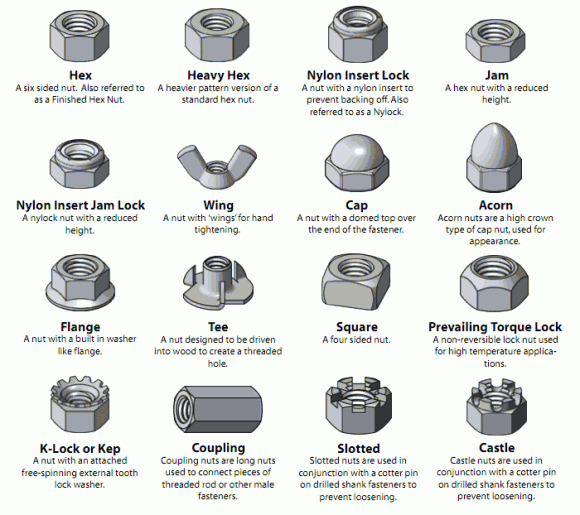
I love references, and this Visual Glossary of Screws, Nuts, and Washers by Mike Senese warms my hardware-writer’s heart.

Types of Nuts

Mike’s talking about BoltDepot, which looks like a great source.

I remember writing user docs with an entire appendix dedicated to port pinouts and diagrams. And I always kept a copy of the Black Box catalog nearby in case I needed to look something up. Of course, now we have Google.

Written by Alan

January 15th, 2012 at 2:59 pm

Posted in Tools

Any doc, any place?

without comments

With the combination of responsive web design, modern content tools such as Madcap Flare, and the proliferation of mobile internet devices for viewing content, it has become so much easier for technical communicators to design and create documentation that meets the need of their audience when — and where — they users need it.

While the leading-edge examples get the buzz in tech comms circles, I think the majority of user docs are still designed according to concepts and practices from five or ten years ago. That is, they still have at their heart a WinHelp or even paper baseline for the design and content decisions.

Many old-school technical communicators have an “architecture mindset” as Ethan Marcotte describes in his post on A List Apart:

English architect Christopher Wren once quipped that his chosen field “aims for Eternity,” … Unlike the web, which often feels like aiming for next week, architecture is a discipline very much defined by its permanence. … Creative decisions quite literally shape a physical space, defining the way in which people move through its confines for decades or even centuries.

For each separate viewing experience — paper, online help, web, mobile — designers would (and often still do) create a new architecture for delivering the content. But now the tools and support to truly separate the content from its delivery are widely available.

Not all technical communicators want to work this way. It’s different, and possibly scary. As Scriptorium’s Sarah O’Keefe keenly notes:

Technical communication is in the midst of a huge transition from a craft/artisan model to an engineering model.

But I think most professional technical communicators welcome the new technology, and the new opportunities to deliver information in better ways. As responsive design, flexible content tools, and mobile delivery truly hit the mainstream, they will bring a huge, positive change to the way user documentation is created and delivered.

Written by Alan

October 5th, 2011 at 10:39 am

Overheard

without comments

Only two things will survive nuclear annihilation: cockroaches and the Adobe Reader updater.
@crimmins
crimmins

Written by Alan

October 2nd, 2011 at 10:02 am

Posted in Tools

Boston Globe gets responsive

without comments

I’m impressed so far with the redesign of the Boston Globe website. The new layout is clean and easy to use, but best of all it now features responsive design so that the page display adapts to whatever device you view it on. I have only casually browsed the site so far, but I have tried it on my notebook, smartphone, and color ebook reader. (OK, that’s a ThinkPad, Droid Incredible, and Nook Color.) The stories are easy to find and follow on all devices, and site performance seems good (unlike the old boston.com sluggishness).

I currently subscribe to home delivery of the Sunday Boston Globe, and every time the paper is wet, missing, or late I think seriously about canceling. However, access to the new online Globe is now included with the subscription. I think this new redesign may be enough to keep me subscribed.

Written by Alan

September 13th, 2011 at 9:13 am

MadCap Roadshow (Boston)

without comments

On Monday, May 23, I attended the Boston edition of the MadCap Software roadshow (actually, it was held in Dedham). The event is a full day of high-level training and show-and-tell about MadCap’s Flare.

MadCap founder Mike Hamilton presented, along with MadCap support guy Neil Posner. Also on hand was a famous local Neil: Flare guru Neil Perlin (I remember when Neil was a RoboHelp guru!). The presentations covered a nice mix of the latest trends in technical communications, plus new and key features of Flare. The Flare stuff never got too salesy, which I appreciated.

One of the highlights of the day for me was Mike’s CSS presentation. He gave an excellent explanation of how they work, and his handouts have become a part of my reference library.

The latest version of Flare includes a QR code generator. While this feature is very cool, I do wonder if QR codes will stick around or if they are just another fad. I have used them in several documents for a client, but I haven’t heard how successful they are in the wild. However, Neil Posner’s demonstration was top notch.

I enjoyed the MadCap Roadshow and feel like I got my money’s worth. I’m not sure it’s an event I need to attend every year (especially on my own dime) but this year, with the release of Flare 7, was a good one to catch.

Written by Alan

May 25th, 2011 at 1:13 pm

Posted in Tools