Alan Brandon

Tech writing, content strategy, and marketing communications

Archive for the ‘Trends’ Category

Wikipedia to add video tools

without comments

Wikipedia will soon add video to their online encyclopedia. That’s pretty cool, but what’s even more impressive is that they will eventually be adding web tools to allow Wikipedia users to edit the video online.

wikivideo_x600

From an article on Technology Review:

The project also includes developing Web tools to create smooth methods for transferring and editing videos. When a Wikipedia editor finds relevant snippets, he will be able to preview them, and set the “in” and “out” points, without having to worry about file conversions.

The convergence of words, pictures, sound, and video is getting closer to “seamless”. With in-browser tools becoming more widespread (photo editing tools in Flickr, for example) the breadth of media available for techincal communicators is greater than ever before. I know this will benefit information users and consumers in the end (as soon as tech “writers” figure out how to take advantage of the new tools).

via 2moro docs.

Written by Alan

June 23rd, 2009 at 3:15 pm

Posted in Tools, Trends, Uncategorized

iFixit’s “fabulously cool” new teardown platform

without comments

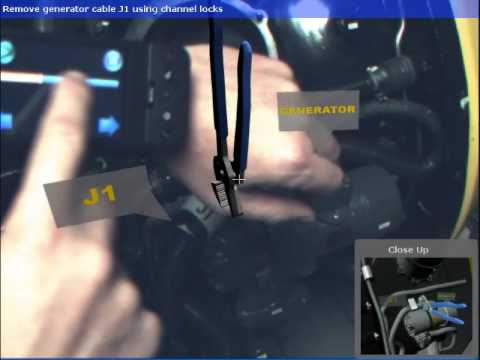
Lawrence Lessig posted about an interesting new feature on the iFixit website. iFixit sells Apple iPod and PowerBook parts and accessories, but they also provide illustrated how-to instructions for how to service these Apple products. Now, they have provided a “teardown platform” to help users post their own procedures. The platform takes advantage of the backend system that iFixit uses to provide their own procedures.

iFixit is providing a "teardown" platform for user-contributed procedures

iFixit is providing a "teardown" platform for user-contributed procedures

This is a great development in user-contributed documentation. While iFixit’s content may not be as complex as a newtork admin reference, for example, this platform may prove to be a good model for technical communicators going forward.

Written by Alan

June 4th, 2009 at 5:13 pm

Posted in Trends

Write your next manual in PowerPoint

without comments

There’s a great post on the DMN Communications blog about a new book from O’Reilly Media called The Twitter Book. The book, by Tim O’Reilly and Sarah Milstein, was written entirely using PowerPoint.

As Scott at DMN puts it:

So what does this have to do with tech comm? A lot, believe it or not. Each page is self contained. In most cases, you don’t need to read other pages of the book in order for that page to make sense. This approach is very similar to … topic-based writing.

Now, topic-based writing is one of those concepts that ebbs and flows in technical communications. I have seen a surge of interest in it lately, in the context of XML and structured documentation. But topic-based writing — sometimes unflatteringly called “chunking” — has been around for many years. When I was at HP, the official writing guide was based the idea that each “topic” was a standalone chunk of information.

Good topic-based writing is hard. In topic-based writing you have to carefully plan the structure of your information, which drives the structure of your document (book, help, etc). You also have to write succinctly and avoid going off on tangents.

Topic-based technical writing is easiest when you have a well-designed product to write about. (OK, all technical writing is easier when you have a well-designed product.)

Tim O’Reilly blogged about writing The Twitter Book using PowerPoint, the ubiquitous presentation app (emphasis is mine):

The web has changed the nature of how we read and learn. Most books still use the old model of a sustained narrative as their organizational principle. Here, we’ve used a web-like model of standalone pages, each of which can be read alone (or at most in a group of two or three), to impart key points, highlight interesting techniques or the best applications for a given task. Because the basics are so easy, there’s no need to repeat them, as so many technical books do. Instead, we can rely on the reader to provide (much of) the implicit narrative framework, and jump right to points that they might not have thought about.

You don’t see many technical documents about how to use a hammer or a light switch, because the basics are so easy. But a lot of users (the customers!) get frustrated by product documentation because it spends too much space covering what they already know and not what they need to know. How often have you seen technical documentation in which the first few steps of every procedure are: switch the unit on, make sure the cables are connected, etc. In the reader’s implicit narrative they have already done all that. They are looking for the next bit of information. The next topic. The next chunk.

O’Reilly discusses some of the reasons tha he chose PowerPoint for the The Twitter Book including ease of updates and speed. The entire blog post is worth a read. Will I be writing my next router CLI reference manual using PowerPoint? I doubt it, unless I get a really good hourly rate. For now I’ll stick with Flare and FrameMaker. How about you?

Written by Alan

May 14th, 2009 at 3:56 pm

Posted in Tech Writing, Trends

Tech Twittering?

without comments

The microblogging service Twitter is experiencing monster growth. It’s great for keeping in touch with your friends and fans, but does it have any use in tech writing? Paul Pehrson discusses this in his recent blog post, “Twitter and Tech Communication“:

I’ve seen several Flare users get product support from MadCap employees using Twitter, and I think that is nice for a quick question with an easy solution. Twitter, however, is not a great format for a detailed question that required specific examples and detailed answers. In such cases, the best solution is probably to go to a related email list or forum where you can ask the question in enough detail that experienced users can provide helpful results.

Twitter can be a great tool, and can help people get answers quickly. However, when you have a question and need an answer, you probably ought to consider your question, and determine what channel is best suited for the type of answer you need. That may or may not be Twitter.

Pehrson focusses on Twitter in a customer support role. While complex answers won’t fit in Twitter’s 140-character limit, a tweet is an excellent “RTFM” vehicle. Just like the live chat some support sites offer, Twitter lets a support rep send the customer a link to the information they can read on their own.

Written by Alan

May 2nd, 2009 at 11:10 pm

Posted in Tools, Trends

Tagged with ,